Your panel runs
the sites. We run
the email.
Server panels run your sites well and leave email to someone else. GhostParse gives your domains mailboxes in your own encrypted webmail on your own server, receives email for your apps, and sends from your sites so it reaches the inbox. One account for all of it, instead of a sending service plus paid mailbox seats.
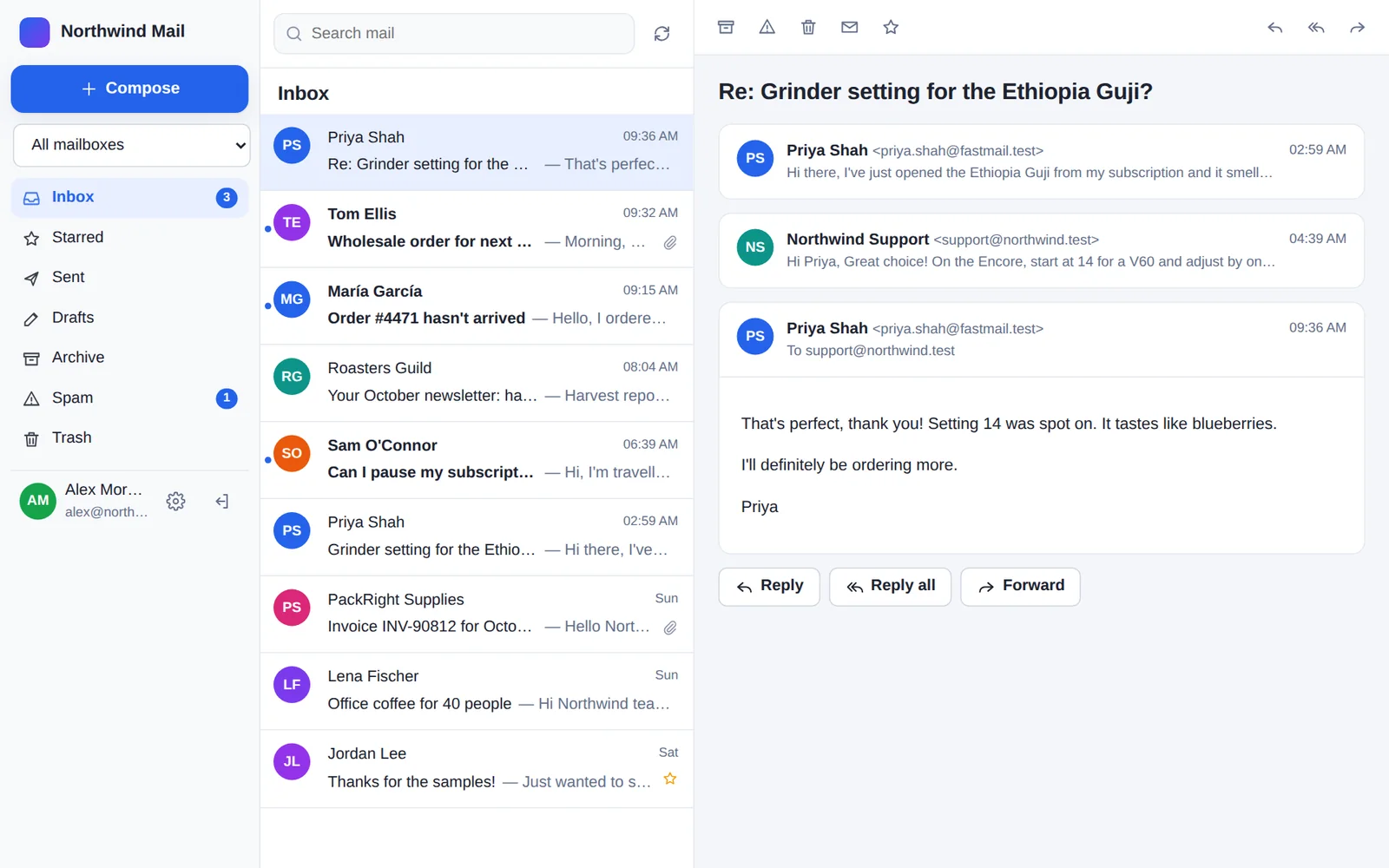
Everything email, beside the sites you already run.
Mailboxes for your domains
info@, support@ and everyone's own address, read in a fast webmail that installs on phones and computers like an app. It runs on the server you already pay for, with the mail encrypted in your own MySQL database.
Your sites' email reaches the inbox
Contact forms, order emails and password resets are sent signed for your domain with SPF, DKIM and DMARC. Use the WordPress plugin, the Laravel package or the API. No SMTP server to look after.
Email into your apps
Email to any address can arrive at your app as a signed webhook, with the attachments and the reply text pulled out, or as data from a parser.
Bring your old email
Moving from Google Workspace or Microsoft 365? Sign in with Google or Microsoft in the webmail, choose the folders, and it's copied across, keeping read and starred marks.
DNS done for you
The dashboard shows the records for each domain and checks them. If your DNS is at Cloudflare, it adds them for you.
Made for agencies
Look after clients' sites? Give each client their own account under yours, with your brand on their dashboard, and manage them all with the reseller API.
Webmail on your server in about ten minutes.
1. Set up your domain
Create an account and add your domain in the dashboard. Add the DNS records it shows you, or let it add them at Cloudflare. Then, under Addresses, create the mailboxes you want, such as you@ and info@.
2. Make a site for the webmail
In your panel, create a new PHP site on a subdomain such as mail.example.com, with PHP 8.1 or newer. Point the subdomain at the server (an A record), and turn on its free SSL certificate. Then create an empty MySQL database and a user for it. Where to find these in your panel.
3. Make the install command
In the dashboard, open your domain and choose Install the webmail over SSH → Make the install command. You get two lines to paste, with a one-time setup code in place of an API key and signing secret:
curl -fsSLO https://ghostparse.com/install/webmail.sh
sh webmail.sh --dir=/path/to/the/site/folder --url=https://mail.example.com --code=wms_…
The code works once, for an hour. It gives the webmail its own API key, which you can see and revoke under API keys, and connects your domain's addresses.
4. Run it over SSH
Sign in to the server over SSH as the site's user (the panel shows it). Change --dir to the new site's folder, and run the two lines. The installer checks the server's PHP, downloads webmail 1.7.4 and checks it against its checksum. Then it asks for the database and your own password, nothing else. Passwords are typed unseen and never land in your shell history. Then it installs, and checks that the web server keeps the webmail's code and settings private.
- The folder should be empty. A placeholder page the panel put there is moved aside. If anything else is there, it asks first.
- If the install fails, the folder is put back as it was, the key the code made is revoked, and it tells you why.
- Open the webmail's address, sign in, and set up two-step verification. Your mailboxes are there, and new email arrives straight away.
- To update, run it again with the same
--dir. Your settings are kept. - No setup code? Leave out
--code, and it asks for an API key (with the send and domains scopes) and the signing secret from Inbound webhook. - For scripts:
--yesasks nothing, taking secrets fromWEBMAIL_DB_PASS,GHOSTPARSE_API_KEY,GHOSTPARSE_WEBHOOK_SECRETandWEBMAIL_ADMIN_PASSWORD.sh webmail.sh --helplists every option.
5. On nginx alone, add the privacy rules
Apache and LiteSpeed read the webmail's .htaccess files, which keep its code, settings and stored files private. nginx on its own doesn't. If the installer finds those files reachable, it prints these rules for the site's nginx configuration (with the folder in the paths if the webmail isn't at the site's root):
location ~ ^/(app|storage|tests|vendor)/ { deny all; }
location ~ ^/(config\.php|config\.php\.tmp|setup-preset\.php|install-cli\.php|\.user\.ini|README\.md)$ { deny all; }
location = /sw.js { add_header Cache-Control "no-cache"; }
client_max_body_size 48m;
Add them, reload nginx, and run the installer again with the same --dir to check.
6. Send from your sites
WordPress: install the GhostParse plugin and choose Connect. Laravel: composer require wildye/email-parser-laravel. Anything else: the API or an SDK. Your server can then stop sending email itself.
Where things are.
Panels move things around from time to time. If something here doesn't match, the installer still checks everything, and tells you what's missing.
| Panel | The site's folder (for --dir) | nginx rules (step 5) |
|---|---|---|
| RunCloud | Create a Web Application with a custom PHP stack. Its folder is under /home/<user>/webapps/. Databases are on the server's Databases page. | Not needed with the NGINX + Apache2 hybrid stack. With native NGINX, add them in the web app's NGINX config. |
| ServerPilot | /srv/users/<user>/apps/<app>/public. Create the database in the app's Database tab. | Not needed: Apache reads the .htaccess files. |
| Ploi | /home/ploi/<domain>/public (the site's web directory). Databases are on the server's Databases tab. | Needed. Add them in the site's NGINX configuration. |
| Laravel Forge | /home/forge/<domain>/public (the site's web directory). Databases are on the server's Database tab. | Needed. Add them with Edit Nginx Configuration on the site. |
| Cloudways | A Custom PHP application's public_html folder. The database comes with the application: its details are under Access Details. | Not needed: Apache reads the .htaccess files. |
| CloudPanel | A PHP site's /home/<site-user>/htdocs/<domain>. Databases are on the site's Databases tab. | Needed. Add them in the site's Vhost editor. |
| Your own server | Any folder your web server serves over HTTPS, with PHP 8.1+ and MySQL 5.7+ or MariaDB 10.3+. | Needed on nginx, not on Apache or LiteSpeed. |
Before you start.
Does it run a mail server on my server?
No. GhostParse receives and sends the email. Your server runs the webmail, a PHP app like any other site, with no mail server, open ports or cron jobs to look after. Email arrives at the webmail as signed webhooks.
What does it cost?
The webmail and installer are free. Email sent and received counts towards your GhostParse plan, and copying in your old email doesn't. Pricing.
Can I use Outlook, Apple Mail or my phone's mail app?
The webmail installs on phones and computers like an app, with notifications for new email and sign-in with Face ID or a fingerprint. It doesn't offer IMAP for other mail apps.
I'm moving from Google Workspace or Microsoft 365. What about my old email?
In the webmail, open Settings → Import email and sign in with Google or Microsoft (or use an app password). Choose the folders and it copies them across. Then point your domain's mail at GhostParse, and a day later choose Check for new mail to catch anything that arrived in between.
I run my clients' sites. Can each client have their own?
Yes. Each client can have their own account under yours, with your brand on their dashboard and invitations. Install a webmail for each client's domain, with a key from their account. Email us to turn on reseller features.
Is the installer safe to run?
Read it first if you like: it's a plain shell script, and curl -fsSLO saves it without running it. It changes nothing until every question is answered, and it checks the setup code first. It only writes to the folder you give it, never asks for root, and puts the folder back if the install fails. The download is checked against its SHA-256 checksum, a0d2b18c5234bec6ce082c761b2b0d4796665107d737c7763faddffc14e84ece.
On cPanel instead?
Use Connect cPanel in the dashboard to install the webmail for you. Hosting companies can install the cPanel & WHM plugin.